Give the job a home.
Create a project by name. Drop PDF tickets into its queue. The app reads the key details for your review and flags items that need attention.
From a contractor’s PDF to a signed ticket and a clear project total. One focused Windows app for field supervisors and project managers.
REVIEW. SIGN. TRACK.
No hunting through email chains or building a new spreadsheet for every job. Keep the ticket and its details together.
Create a project by name. Drop PDF tickets into its queue. The app reads the key details for your review and flags items that need attention.
Check the original PDF, correct any details, then place your printed name, signature and date. Add them wherever needed and complete signing.
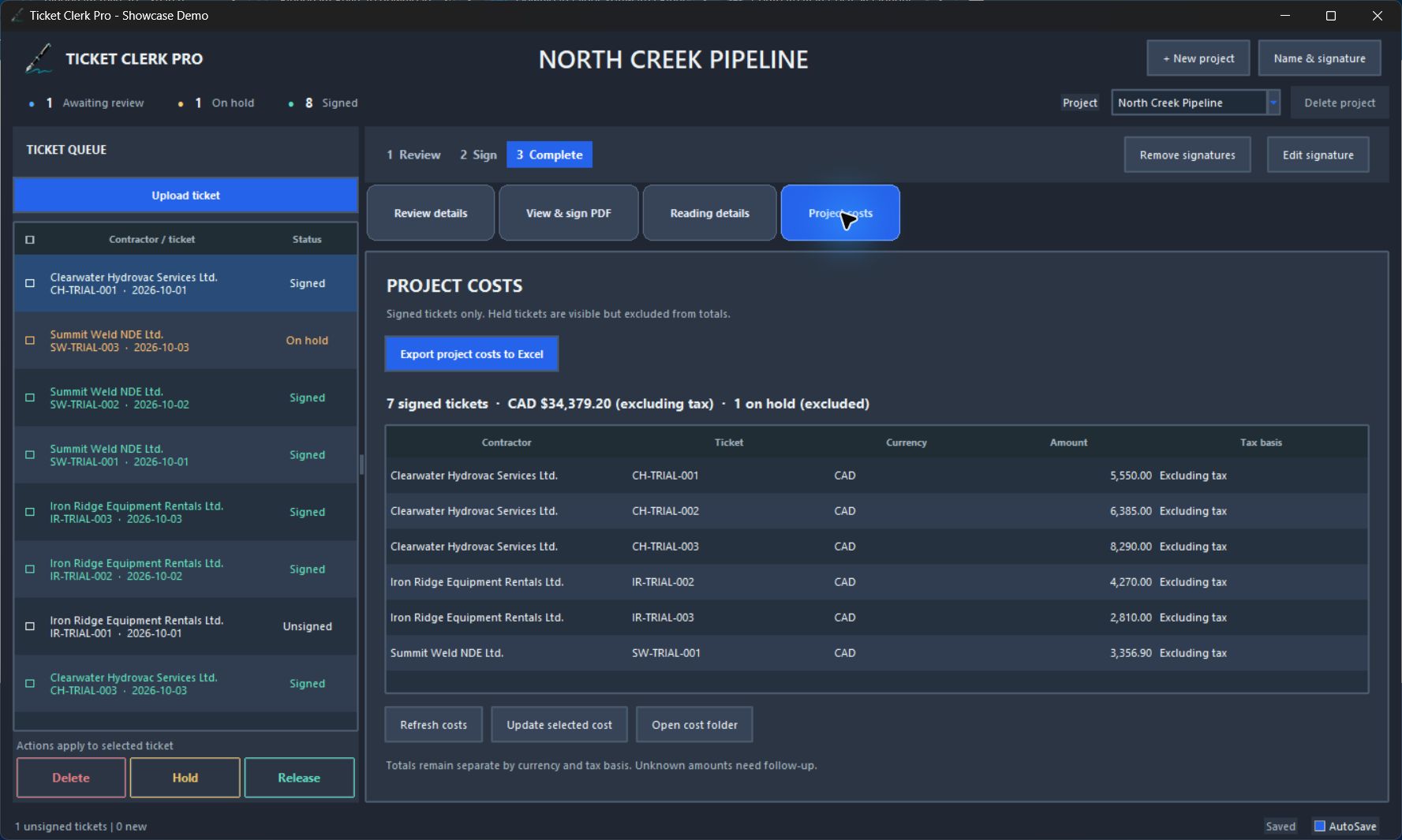
Signed PDFs are filed under each contractor. Export ticket numbers, dates, costs, contractor subtotals and the project total to one Excel worksheet.
FOLLOW-UP WITHOUT THE GUESSWORK
A charge needs checking. Put the ticket on hold and its cost leaves the project total. Release a signed ticket when it’s resolved, and its cost returns.
Organised by project. Grouped by contractor.
Ready to find when you need them.
SEE THE WHOLE WORKFLOW
This demo shows the earlier Ticket Desk branding. The product is now Ticket Clerk Pro. All contractors, charges and signatures shown are fictional.
SIMPLE ANNUAL PRICING
Built around the work you do every day: review, sign, file and report. Local project records and offline use during an active licence.
30-day free trial, then US$199 annually, plus applicable taxes.
Paid signup is not open yet. Once launched, annual billing will begin after the trial and renew automatically unless cancelled. Price and renewal terms will be shown before you agree. This evaluation download does not charge you.
PUT IT THROUGH ITS PACES
Try the Windows evaluation with 30 fictional tickets from three contractor types: equipment rentals, hydrovac and weld NDE.
Download Windows trial ↓Windows 10/11, 64-bit · 30-day evaluation · No card required for this preview
Unsigned preview build. Follow your organisation’s software approval process.
A FEW PRACTICAL DETAILS
Ticket reading, signing, filing and cost reporting run locally. The commercial preview accepts an offline licence file with an expiry date. Online signup and automatic licence renewal are still being connected.
No. You review the document, place the marks and choose Complete signing. A signature image is a visible PDF mark, not a certificate-based digital signature.
The trial stops opening after 30 days. Your PDFs and project records are retained. This preview does not collect payment information or enrol you in automatic billing.
We are setting up support@ticketclerkpro.com. The mailbox is not active yet. Preview testers should contact the person who supplied their download.
Yes. PDF layouts and scan quality vary. Always compare extracted details with the source ticket before signing or reporting costs.